TeraPlay: Lightweight Android player for local files and streams
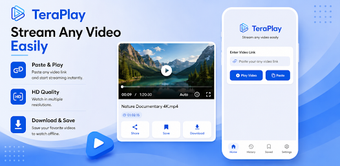
TeraPlay - Online Video Stream, developed by ShadowLink, is an Android media player designed to play local files and stream video URLs efficiently. The app handles playback and direct URL streaming while offering gesture-based controls, subtitle loading, background audio, and hardware-accelerated rendering for smoother viewing. It supports common containers such as MP4, MKV, AVI, and FLV. Android users who need a single app for stored media and web-hosted streams benefit from its compact, focused playback approach.
Unlock your creativity with Adobe Stock
Get 10 images or 1 video with a free trial
What is TeraPlay used for?
TeraPlay serves as a compact player and streaming client on Android, combining offline playback with immediate network URL playback. Users can open local files or paste a direct video link to begin streaming, and the interface keeps both kinds of media accessible within the same library. Background audio mode lets the app continue delivering audio while other apps run, which suits listeners who switch between tasks.
What video formats does it support?
The player accepts standard containers including MP4, MKV, AVI, and FLV, enabling playback without installing additional codecs. External subtitle files can be loaded and customized for readability, and hardware acceleration is available to assist decoding on capable devices. These characteristics help the app play a broad set of files that users commonly encounter from cameras, downloads, and cloud storage.
How well does TeraPlay handle high-resolution streams?
TeraPlay supports high-definition and 4K playback when the device hardware permits. The app includes hardware acceleration to reduce rendering load and is optimized for external streaming links to limit buffering during playback. Playback controls such as speed adjustment plus gesture-based volume and brightness let users manage performance and viewing comfort during long or demanding streams.
Is TeraPlay better for beginners or professionals?
The tool targets everyday viewers and mobile consumers rather than content creators. The interface emphasizes quick access to stored and web-based media, lowering the barrier for users who just want to watch or listen. Advanced production features like mixing consoles or editing toolsets are not present, and user reports note in-app advertisements that some viewers find intrusive during extended sessions.
Practical choice for viewers, not for production workflows
TeraPlay is a practical option for casual viewers and mobile listeners who want a single app to access both stored and web-hosted video. It favors straightforward playback behavior over editing capabilities, so creators needing detailed audio control or timeline editing should look elsewhere. Accept the trade-off of in-app advertisements and device-dependent 4K performance when choosing it for everyday consumption tasks.
Pros
Plays MP4, MKV, AVI, and FLV without extra codecs
Accepts direct streaming URLs for immediate playback
Background audio mode keeps sound active while multitasking
Hardware acceleration reduces rendering load for high-res video
Cons
Contains in-app advertisements that can interrupt playback
4K playback depends on the device's hardware capability
Requires Android 5.0 or higher, excluding older devices
Laws concerning the use of this software vary from country to country. We do not encourage or condone the use of this program if it is in violation of these laws. Softonic may receive a referral fee if you click or buy any of the products featured here.